Definition:
Query Processing is the series of steps a database management system (DBMS) takes to receive a query (usually in SQL), understand it, figure out the best way to execute it, and then actually run it to produce results.
🛤️ Steps in Query Processing
-
Parsing and Translation
-
The DBMS reads the SQL query.
-
It checks syntax (e.g., is the query written correctly?) and semantics (e.g., are the table and column names valid?).
-
Then it translates the query into an internal form (usually a tree or graph structure).
-
-
Optimization
-
The DBMS tries to find the most efficient way to run the query.
-
It might choose between different indexes, different join methods (nested loop join, hash join, etc.), or different query plans.
-
Cost Estimation is done here (cost = CPU time + Disk I/O + Memory usage).
-
-
Query Evaluation Plan (Logical and Physical)
-
Logical Plan: The “what to do” part (e.g., join these two tables).
-
Physical Plan: The “how to do it” part (e.g., use a hash join instead of a nested loop).
-
The DBMS decides operators and algorithms.
-
-
Execution
-
Finally, the best plan is executed.
-
Data is retrieved, computations are performed, and the result is given to the user.
-
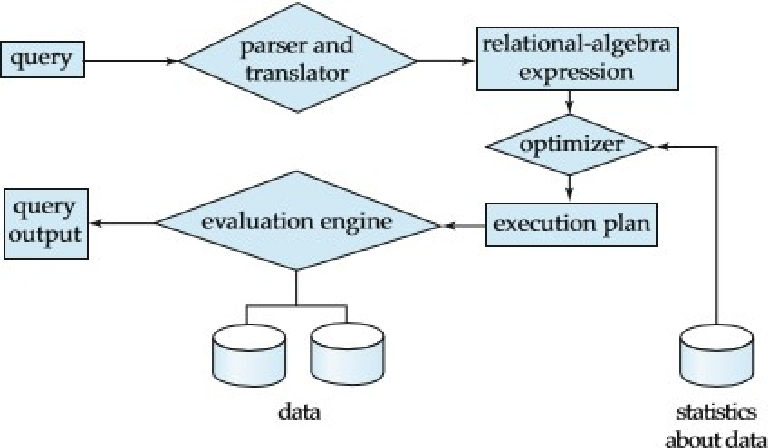
⚙️ Simple Example Flow
Imagine you write this query:
SELECT name FROM Students WHERE age > 20;Here’s what happens:
-
Parsing: Checks if
Studentstable andagecolumn exist. -
Translation: Creates a parse tree.
-
Optimization: Decides whether to do a full table scan or use an index on
age(if it exists). -
Execution: Fetches names of students older than 20 and shows you the list.
🧠 Why is Query Processing Important?
-
Improves performance: A bad plan could be 100x slower than a good one!
-
Ensures correctness: The right results must be returned.
-
Saves resources: Less CPU, memory, and disk usage.
🗺️ Visualization (Imagine it like this)
SQL Query ↓ Parsing and Translation ↓ Optimization (finding the best route) ↓ Query Evaluation Plan (plan the moves) ↓ Execution (actually walk the path and bring data) ↓ Result
🔥 Bonus Tip
Modern DBMS like MySQL, PostgreSQL, and Oracle have query optimizers that are super smart, but you can still influence them by writing better queries or creating indexes.
🧩 In short
Query Processing = Understand the query → Find the best way to run it → Run it efficiently
🚚 Query Processing is Like a Food Delivery
Imagine you open a food delivery app (like UberEats).
Step 1: Parsing and Translation (Understanding Your Order)
-
You type: “I want a large pizza with extra cheese.”
-
The app reads your request.
-
It checks: Is “pizza” on the menu? Is “extra cheese” an available option?
-
If yes, it translates your text into an internal order for the restaurant.
Step 2: Optimization (Finding the Best Restaurant and Delivery Route)
-
The app chooses:
-
Which pizza place is closest?
-
Which place has the best rating?
-
Which route for the driver will be fastest?
-
-
It tries to minimize cost, time, and maximize service quality.
Step 3: Query Evaluation Plan (Deciding How to Deliver)
-
It plans:
-
Pickup first, then deliver?
-
Send multiple deliveries in one trip?
-
-
It finalizes how your pizza will get to you.
Step 4: Execution (Delivering Your Pizza!)
-
The restaurant makes the pizza.
-
The driver picks it up.
-
The driver follows the optimized route.
-
You get your pizza hot and fresh!
🍕 So, linking it back
| Food Delivery Step | Database Step |
|---|---|
| Understand your food order | Parse and translate query |
| Find best restaurant/route | Optimize query plan |
| Plan delivery | Create query evaluation plan |
| Deliver food | Execute the query |
🧠 Quick Reminder to Yourself
Query processing = Reading the request → Planning smartly → Acting efficiently
Just like you want your pizza fast, hot, and correct, you want your database query fast, correct, and resource-efficient!
📚 Query Languages in Databases
Definition:
A query language is a way for users to ask questions or request data from a database, usually by writing specific commands.
Think of it as the language you speak when you talk to the database!
🛤️ Types of Query Languages
There are mainly four types:
1. DDL (Data Definition Language)
-
Purpose: Define or modify the structure of the database (like tables, schemas, indexes).
-
Examples:
CREATE TABLE Students (id INT, name VARCHAR(50)); ALTER TABLE Students ADD age INT; DROP TABLE Students;- Keywords:
CREATE,ALTER,DROP,TRUNCATE
2. DML (Data Manipulation Language)
-
Purpose: Work with the data itself — inserting, updating, deleting, or retrieving data.
-
Examples:
INSERT INTO Students (id, name) VALUES (1, 'Jonas'); UPDATE Students SET name = 'Jonas King' WHERE id = 1; DELETE FROM Students WHERE id = 1; SELECT * FROM Students;- Keywords:
INSERT,UPDATE,DELETE,SELECT
3. DCL (Data Control Language)
-
Purpose: Control access to data — who can see or modify it.
-
Examples:
GRANT SELECT ON Students TO user123; REVOKE SELECT ON Students FROM user123;- Keywords:
GRANT,REVOKE
4. TCL (Transaction Control Language)
-
Purpose: Manage transactions — making sure a group of operations either all succeed or all fail (important for data safety).
-
Examples:
BEGIN; UPDATE Students SET name = 'Jonas' WHERE id = 1; COMMIT; -- If error ROLLBACK;- Keywords:
BEGIN,COMMIT,ROLLBACK,SAVEPOINT
⚙️ Visualization
|------------------- | DDL |---------------| DML |---------------| DCL |----------------| TCL | -----------------------------------------
--------------- | Define Structure | Work with  Data | Control  Access | Control Transactions | -------------------------------------
🎯 Important Notes
-
SQL (Structured Query Language) is the most common query language.
-
Some NoSQL databases (like MongoDB) use different styles of query languages (e.g., JSON-based queries).
-
A good query language should be:
-
Easy to use (simple syntax)
-
Expressive (can handle complex requests)
-
Efficient (executes fast internally)
-
🧠 Quick Memory Trick
“Damn Database Can Talk!”
(DDL, DML, CL, TCL)
📦 In short
Query Languages = Tools to create, manipulate, protect, and control database data.
📚 Relational Algebra
Definition:
Relational Algebra is a formal system (like math) for manipulating and querying data stored in relational databases (i.e., data organized in tables).
It gives you a set of operations (like SELECT, JOIN, UNION) that you can use to build queries by combining these operations.
🔔 Important:
-
It is procedural: You describe how to get the result step-by-step.
-
SQL (which you use daily) is based on the concepts of relational algebra!
🛤️ Basic Operations of Relational Algebra
Here are the main ones you must know:
1. Selection (σ - Sigma)
-
Purpose: Pick rows (tuples) that satisfy a condition.
-
Syntax:
σ condition (Relation) -
Example:
Find all students older than 20:σ age > 20 (Students)
2. Projection (π - Pi)
-
Purpose: Pick specific columns (attributes).
-
Syntax:
π columns (Relation) -
Example:
Get only names of students:π name (Students)
3. Union ( ∪ )
-
Purpose: Combine results from two relations, removing duplicates.
-
Syntax:
Relation1 ∪ Relation2 -
Example:
Students from ClassA or ClassB:ClassA ∪ ClassB
4. Set Difference ( - )
-
Purpose: Find rows in one relation but not in another.
-
Syntax:
Relation1 - Relation2 -
Example:
Students in ClassA but not in ClassB:ClassA - ClassB
5. Cartesian Product ( × )
-
Purpose: Combine each row of one table with each row of another.
-
Syntax:
Relation1 × Relation2 -
Example:
If Students has 3 rows and Courses has 2 rows, you get 3×2 = 6 combinations.
6. Rename ( ρ - Rho )
-
Purpose: Rename a relation or its attributes (columns).
-
Syntax:
ρ newName (Relation) -
Example:
Rename Students to Pupils:ρ Pupils (Students)
7. Joins (⨝)
-
Purpose: Combine two tables based on a condition (usually matching columns).
-
Types of Join:
-
Theta Join (θ-join): Use any condition
-
Equi Join: Use equality condition
-
Natural Join: Automatically joins on common columns
-
-
Example of Natural Join:
plaintext
Copy code
Students ⨝ Departments
🧠 Quick Summary Table
| Operation | Symbol | Purpose |
|---|---|---|
| Selection | σ | Pick rows |
| Projection | π | Pick columns |
| Union | ∪ | Merge results |
| Difference | - | Find exclusive rows |
| Cartesian Product | × | All row combinations |
| Rename | ρ | Rename tables/columns |
| Join | ⨝ | Combine tables based on condition |
🎯 Why is Relational Algebra Important?
-
Forms the theoretical foundation for SQL.
-
Helps optimize queries internally in a DBMS.
-
Ensures that queries are precise and mathematically correct.
-
Good to understand for database exams and advanced database design.
🛤️ Example (Putting it all together)
Question:
Get names of students from ClassA or ClassB who are older than 20.
Relational Algebra Expression:
π name (σ age > 20 (ClassA ∪ ClassB))Explanation:
-
First combine ClassA and ClassB using Union.
-
Then select students older than 20.
-
Then project (select) only the
namecolumn.
🎨 Visualization Idea
Start ↓ ClassA ∪ ClassB ↓ σ age > 20 ↓ π name ↓ Result🧩 In short
Relational Algebra = A “mathematical toolbox” 🧰 to query, manipulate, and combine tables using operations like select, project, union, join, etc.
⚡ Short Tricks to Choose Operations
| IF the question says… | THEN use… |
|---|---|
| ”Pick some rows” | Selection (σ) |
| “Pick specific columns” | Projection (π) |
| “Combine data from two tables” without conditions | Cartesian Product (×) |
| “Combine data from two tables where a condition matches” | Join (⨝) |
| “Merge results from two sources” (allowing all, no duplicates) | Union (∪) |
| “Find what’s in A but NOT in B” | Set Difference (-) |
| “Rename table or columns” | Rename (ρ) |
🧠 Memory Trick for Fast Recall
“Row? → σ | Column? → π | Merge? → ∪ | Match? → ⨝ | Exclusive? → -”
🎯 Quick Example Based on Tricks
✅ “List all students older than 18”
→ Rows satisfying a condition → Selection (σ)
✅ “Get only names and ages of students”
→ Columns only → Projection (π)
✅ “Show all employees and their departments”
→ Match between Employees and Departments → Join (⨝)
✅ “Find students who took Math but not Physics”
→ Exclusive rows → Set Difference (-)
✅ “Rename table Students to Pupils”
→ Change name → Rename (ρ)
🏆 Pro Tip for Exams
Sometimes you need more than one operation combined:
-
Always work inside → out.
-
Start solving the inner expressions first (like you do brackets in math).
Example:
π name (σ age > 18 (Students))-
Inner part: σ age > 18 (Students) → filter students
-
Outer part: π name → pick only names
🔥 Final Quick Flowchart
Need specific ROWS? ---> Selection (σ) Need specific COLUMNS? ---> Projection (π) Need to COMBINE tables? └── Without condition? --> Cartesian Product (×) └── With matching condition? --> Join (⨝) Need to MERGE results? --> Union (∪) Need DIFFERENCE between tables? --> Set Difference (-) Need to RENAME? --> Rename (ρ)📚 Relational Algebra Notes
Relational Algebra = A set of operations on relations (tables) to retrieve or modify data.
Think of it like math for databases — you apply operations and get new tables as results.
🛠️ 1. Basic Relational Algebra Operations
| Operation | Symbol | What it does | Example |
|---|---|---|---|
| Selection | σ (sigma) | Pick rows based on a condition | σ_{age > 25}(Students) → students older than 25 |
| Projection | π (pi) | Pick specific columns (attributes) | π_{name, age}(Students) → only name and age columns |
| Union | ∪ | Combine two relations (remove duplicates) | Students_A ∪ Students_B |
| Set Difference | − | Find rows in one relation but not the other | Students_A − Students_B |
| Cartesian Product | × | Combine every row of A with every row of B | Students × Courses |
| Rename | ρ (rho) | Rename a table or column | ρ_{NewName}(Students) |
✏️ Simple Examples
Imagine a table Students(id, name, age)
| id | name | age |
|---|---|---|
| 1 | Jonas | 22 |
| 2 | Anna | 24 |
| 3 | Mike | 21 |
-
Selection: σ_{age > 22}(Students)
➔ Result: Anna only (because 24 > 22) -
Projection: π_{name}(Students)
➔ Result: Jonas, Anna, Mike (only names)
🧠 2. Advanced Relational Algebra Operations
These operations are built using basic ones or are slightly more “powerful”.
| Operation | Symbol | What it does | Example |
|---|---|---|---|
| Intersection | ∩ | Find common rows between two tables | Students_A ∩ Students_B |
| Join | ⨝ | Combine two tables based on a related column | Students ⨝_{Students.id = Enrollment.student_id} Enrollment |
| Theta Join | ⨝_{condition} | Join with any condition (not just equality) | Students ⨝_{Students.age > Enrollment.year} Enrollment |
| Natural Join | ⋈ | Auto-join on columns with the same name | Students ⋈ Enrollment |
| Division | ÷ | Special — used to find “for all” type queries | Students_Courses ÷ Courses |
✏️ Quick Examples
-
Intersection:
Students_A and Students_B both have Jonas.
➔ Result: Jonas. -
Join (normal join):
CombineStudentsandEnrollmenttables usingstudent_idmatchingid. -
Division (most tricky):
Suppose you want “students who registered for all courses offered”.You use division for “for all” questions:
Students_Courses ÷ Courses➔ Gives students who have enrolled in every course.
🎯 Easy Way to Remember
-
σ (Selection) = pick rows
-
π (Projection) = pick columns
-
× (Product) = combine every row
-
∪, −, ∩ (Set Operations) = work like set theory in math
-
⨝ (Join) = match and combine rows from two tables
-
÷ (Division) = “all matching” situations
✨ Visual Mindset Tip
Imagine every operation as giving you a new table.
You input one or two tables, apply the operation, and get a new table as output.
🧠 Quick Summary Table
| Type | Operation | Purpose |
|---|---|---|
| Basic | Selection (σ) | Pick rows |
| Basic | Projection (π) | Pick columns |
| Basic | Union (∪) | Merge without duplicates |
| Basic | Difference (−) | Find missing records |
| Basic | Cartesian Product (×) | Every possible combination |
| Basic | Rename (ρ) | Rename tables or columns |
| Advanced | Intersection (∩) | Common records |
| Advanced | Join (⨝) | Combine based on condition |
| Advanced | Theta Join (⨝ with condition) | Join with any condition |
| Advanced | Natural Join (⋈) | Auto join by same-named columns |
| Advanced | Division (÷) | “All” matching queries |
📚 SQL Queries to Relational Algebra
1. Basic SELECT Query (Without WHERE)
SQL
SELECT name, age FROM Students;Relational Algebra
- Projection (π) is used to select specific columns.
π_name, age(Students)Explanation: We use π (projection) to select the name and age columns from the Students table.
2. SELECT Query with WHERE Clause
SQL
SELECT name, age FROM Students WHERE age > 22;Relational Algebra
-
Selection (σ) is used to filter rows based on a condition.
-
Then Projection (π) is used to select the columns we need.
π_name, age(σ_age > 22(Students))Explanation:
-
First, σ (selection) filters the rows where age > 22.
-
Then, π (projection) is applied to select the name and age columns.
3. JOIN Query (INNER JOIN)
SQL
SELECT Students.name, Courses.course_name FROM Students JOIN Enrollment ON Students.id = Enrollment.student_id JOIN Courses ON Enrollment.course_id = Courses.id;Relational Algebra
- Join (⨝) is used to combine two tables based on a matching condition.
π_name, course_name(Students ⨝ Enrollment ⨝ Courses)Explanation:
-
Students ⨝ Enrollment joins the
StudentsandEnrollmenttables using the common columnstudent_id. -
The result is then joined with
Coursesbased on thecourse_id. -
Finally, π (projection) selects only the name and course_name columns.
4. SELECT with DISTINCT
SQL
SELECT DISTINCT age FROM Students;Relational Algebra
-
Projection (π) is used to select the
agecolumn. -
The DISTINCT keyword is inherently handled by relational algebra because it already removes duplicates in the result.
π_age(Students)Explanation: π (projection) selects the age column and removes duplicates by default in relational algebra.
5. SELECT Query with ORDER BY
SQL
SELECT name, age FROM Students ORDER BY age DESC;Relational Algebra
- Relational algebra does not directly support sorting. However, the result can be assumed to be in a specific order if you need it.
Relational algebra focuses on set-based operations, and sorting is a procedural operation not explicitly defined in its theoretical framework.
So, we would use the projection for the columns:
π_name, age(Students)You would need an additional step outside of pure relational algebra for sorting. Sorting can be performed after the algebraic operations on the result set.
6. SELECT with Aggregate Functions (e.g., COUNT, SUM)
SQL
SELECT COUNT(*) FROM Students;Relational Algebra
-
Relational algebra doesn’t have direct support for aggregate functions like
COUNTorSUM. -
However, in practice, you could use a grouping operation (though it’s not formalized in the basic relational algebra).
For now, assume that the grouping and aggregation steps are handled outside the formal relational algebra framework in this context.
7. SELECT with GROUP BY and HAVING
SQL
SELECT age, COUNT(*) FROM Students GROUP BY age HAVING COUNT(*) > 2;Relational Algebra
- Grouping is not directly supported in classical relational algebra, but you can use selection after applying aggregation (in practical terms, it would require extensions to classical relational algebra).
Here’s a rough approximation:
π_age, COUNT*(Students) ⨝ (COUNT(*) > 2)Explanation: In a real-world scenario, this would require both grouping and aggregate functions, which go beyond the classic relational algebra framework.
8. INSERT, UPDATE, DELETE
-
Relational algebra deals primarily with querying and not the modification of data.
-
INSERT, UPDATE, and DELETE are considered procedural operations that modify the database state. They don’t have a direct representation in relational algebra since it’s a declarative language used for querying data, not manipulating it.
These operations are usually handled by SQL.
9. Set Operations: UNION, INTERSECT, EXCEPT
SQL
SELECT name FROM Students_A UNION SELECT name FROM Students_B;Relational Algebra
- Union (∪) is used to combine results from two relations.
π_name(Students_A) ∪ π_name(Students_B)Explanation:
- We project the name column from both
Students_AandStudents_B, and then use ∪ (union) to combine the results.
🎯 Summary of SQL to Relational Algebra Mapping
| SQL Operation | Relational Algebra Equivalent | Explanation |
|---|---|---|
SELECT columns FROM table | π (projection) | Select specific columns |
SELECT columns FROM table WHERE condition | π (projection) ⨝ σ (selection) | Select columns with conditions |
JOIN | ⨝ (join) | Combine two tables based on conditions |
DISTINCT | π (projection) | Automatically removes duplicates |
ORDER BY | Not directly supported | Handled outside relational algebra |
COUNT(*), SUM(*) | Not directly supported | Aggregation requires extensions |
GROUP BY | Not directly supported | Requires grouping extensions |
UNION | ∪ (union) | Combine two result sets |
INTERSECT | ∩ (intersection) | Get common rows |
EXCEPT | − (difference) | Subtract one set from another |
💡 Key Points to Remember
-
Relational algebra is mainly used for querying and doesn’t handle data manipulation (insert, update, delete) directly.
-
Join operations in relational algebra are essential for combining multiple tables.
-
Selection and Projection are the core of most relational queries.
-
Relational algebra is theoretical and doesn’t directly support aggregation or ordering; SQL extensions handle these.