Session based Authentication
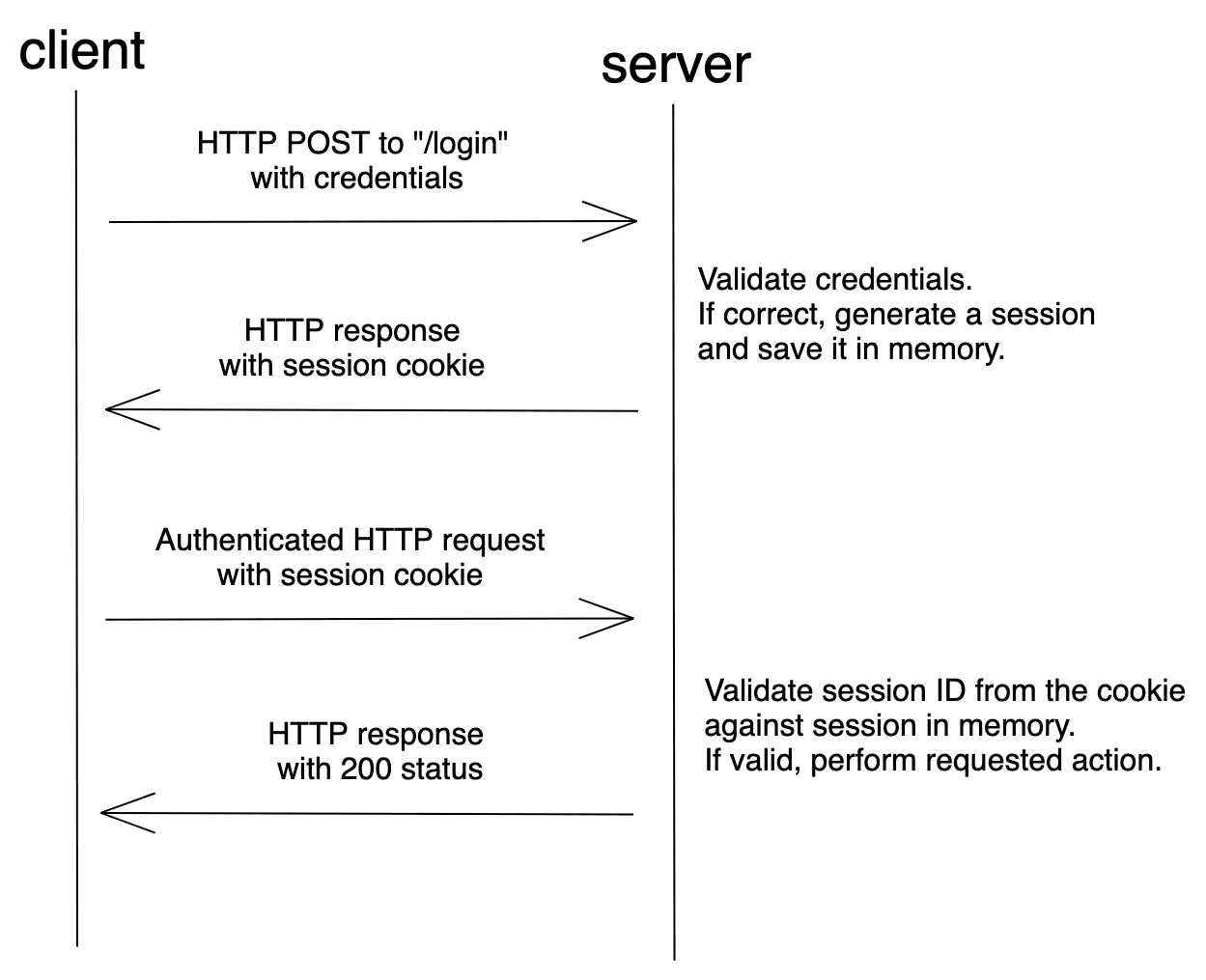
Session-based auth in Django means the server creates a session for a logged-in user, stores session data on the server, and uses a session ID in a cookie to recognize that user on subsequent requests.
Core flow (high level)
-
User submits login form with username/password.
-
Django validates credentials with
django.contrib.auth.authenticate(), then callslogin(request, user). -
login():-
Creates (or rotates) a session via the session framework.
-
Stores the user’s ID in the session (e.g.
request.session['_auth_user_id']). -
Sets a
sessionidcookie on the client containing only the session key (not the user data).
-
-
On later requests:
-
SessionMiddlewareloads session data from the session store using thesessionidcookie value. -
AuthenticationMiddlewarereads user ID from the session and setsrequest.userto aUserinstance (orAnonymousUserif not logged in).
-
-
logout(request)deletes the session data and rotates/clears the cookie so the browser no longer maps to that session.
Session storage details
-
By default, sessions are stored in the database table
django_session(key, serialized data, expiry date). -
You can change storage via
SESSION_ENGINEinsettings.py, for example:-
'django.contrib.sessions.backends.db'(default, DB-backed).[ -
'django.contrib.sessions.backends.cache'(cache only, not persistent). -
'django.contrib.sessions.backends.cached_db'(cache + DB fallback).
-
-
SessionMiddlewaremust be inMIDDLEWARE, and'django.contrib.sessions'must be inINSTALLED_APPS(for DB sessions)
Using session-based auth in views
- Logging in:
from django.contrib.auth import authenticate, login

def login_view(request):
   if request.method == "POST":
       username = request.POST["username"]
       password = request.POST["password"]
       user = authenticate(request, username=username, password=password)
       if user is not None:
           login(request, user)  # sets session + cookie
           # redirect to dashboard
       else:
           # invalid credentials
           ...
- Accessing the authenticated user:
  def dashboard(request):
    if request.user.is_authenticated:  # set by AuthenticationMiddleware
        # request.user is a User instance
        ...
    else:
        # redirect to login
        ...
- Logging out:
from django.contrib.auth import logout
from django.shortcuts import redirect

def logout_view(request):
    logout(request)  # clears session data
    return redirect("home")
Sessions vs tokens (concept)
-
Session-based auth:
-
Server-side stateful; server holds all session data, client only has a session ID cookie.
-
Excellent for traditional server-rendered apps and same-origin AJAX (e.g. DRF
SessionAuthentication).
-
-
Token/JWT-based auth:
-
Stateless; client sends a token (often in Authorization header) that encodes identity; server does not need to look up session.
-
Common for APIs accessed by third-party clients or cross-origin SPAs.
-
Big picture (what it actually is)
Session-based auth = server remembers you.
When a user logs in:
- Django verifies username + password
- Django creates a session on the server
- A session ID is sent to the browser as a cookie
- On every request, the browser sends that cookie back
- Django uses it to identify the user
If the session exists → you’re authenticated
If not → you’re anonymous
1. Settings and URLs
In settings.py:
INSTALLED_APPS = [
    # ...
    "django.contrib.auth",
    "django.contrib.contenttypes",
    "django.contrib.sessions",
    # ...
]

MIDDLEWARE = [
    # ...
    "django.contrib.sessions.middleware.SessionMiddleware",
    "django.contrib.auth.middleware.AuthenticationMiddleware",
    # ...
]

LOGIN_URL = "login"           # where @login_required redirects
LOGIN_REDIRECT_URL = "dashboard"
LOGOUT_REDIRECT_URL = "login"
In your project urls.py:
from django.contrib import admin
from django.urls import path
from myapp import views  # replace with your app name

urlpatterns = [
    path("admin/", admin.site.urls),
    path("signup/", views.signup_view, name="signup"),
    path("login/", views.login_view, name="login"),
    path("logout/", views.logout_view, name="logout"),
    path("dashboard/", views.dashboard_view, name="dashboard"),
]
2. Views (signup, login, logout, dashboard)
In myapp/views.py:
from django.contrib.auth import authenticate, login, logout
from django.contrib.auth.decorators import login_required
from django.contrib.auth.models import User
from django.shortcuts import render, redirect
from django.http import HttpRequest, HttpResponse


def signup_view(request: HttpRequest) -> HttpResponse:
    if request.method == "POST":
        username = request.POST.get("username")
        email = request.POST.get("email")
        password = request.POST.get("password")

        # Very basic validation for demo
        if not username or not password:
            return render(request, "signup.html", {"error": "Username and password required"})

        if User.objects.filter(username=username).exists():
            return render(request, "signup.html", {"error": "Username already taken"})

        user = User.objects.create_user(username=username, email=email, password=password)
        # Optionally log user in immediately:
        login(request, user)
        return redirect("dashboard")

    return render(request, "signup.html")


def login_view(request: HttpRequest) -> HttpResponse:
    if request.method == "POST":
        username = request.POST.get("username")
        password = request.POST.get("password")

        user = authenticate(request, username=username, password=password)
        if user is not None:
            login(request, user)  # creates / updates session
            return redirect("dashboard")
        else:
            return render(request, "login.html", {"error": "Invalid credentials"})

    return render(request, "login.html")


def logout_view(request: HttpRequest) -> HttpResponse:
    logout(request)  # clears session
    return redirect("login")
@login_required  # protects this view – redirects to LOGIN_URL if not authenticated
def dashboard_view(request: HttpRequest) -> HttpResponse:
    return render(request, "dashboard.html", {"user": request.user})
3. Templates (very minimal)
templates/signup.html:
<!DOCTYPE html>
<html>
<head><title>Signup</title></head>
<body>
  <h1>Signup</h1>
  {% if error %}<p style="color:red">{{ error }}</p>{% endif %}
  <form method="post">
    {% csrf_token %}
    <label>Username: <input type="text" name="username"></label><br>
    <label>Email: <input type="email" name="email"></label><br>
    <label>Password: <input type="password" name="password"></label><br>
    <button type="submit">Create account</button>
  </form>
  <p>Already have an account? <a href="{% url 'login' %}">Login</a></p>
</body>
</html>
templates/login.html:
<!DOCTYPE html>
<html>
<head><title>Login</title></head>
<body>
  <h1>Login</h1>
  {% if error %}<p style="color:red">{{ error }}</p>{% endif %}
  <form method="post">
    {% csrf_token %}
    <label>Username: <input type="text" name="username"></label><br>
    <label>Password: <input type="password" name="password"></label><br>
    <button type="submit">Login</button>
  </form>
  <p>No account? <a href="{% url 'signup' %}">Signup</a></p>
</body>
</html>
templates/dashboard.html:
<!DOCTYPE html>
<html>
<head><title>Dashboard</title></head>
<body>
  <h1>Dashboard</h1>
  <p>Welcome, {{ user.username }}!</p>
  <p><a href="{% url 'logout' %}">Logout</a></p>
</body>
</html>
4. How protection works
-
login()setsrequest.session['_auth_user_id']and writes a session ID to thesessionidcookie, tying the browser to that user on the server. -
AuthenticationMiddlewarepopulatesrequest.userfrom the session on every request. -
@login_requiredchecksrequest.user.is_authenticated; ifFalse, it redirects toLOGIN_URLwith anextquery param.
class based view for the views
Use LoginView and LogoutView for auth, and a class-based dashboard protected with LoginRequiredMixin.pythontutorial+2
1. Settings (same as before)
In settings.py:
INSTALLED_APPS = [
    # ...
    "django.contrib.auth",
    "django.contrib.contenttypes",
    "django.contrib.sessions",
]

MIDDLEWARE = [
    # ...
    "django.contrib.sessions.middleware.SessionMiddleware",
    "django.contrib.auth.middleware.AuthenticationMiddleware",
]

LOGIN_URL = "login"
LOGIN_REDIRECT_URL = "dashboard"
LOGOUT_REDIRECT_URL = "login"
2. URLs using class-based views
In your project urls.py:
from django.contrib import admin
from django.urls import path
from django.contrib.auth.views import LoginView, LogoutView
from myapp.views import SignupView, DashboardView  # your app

urlpatterns = [
    path("admin/", admin.site.urls),

    # auth
    path("signup/", SignupView.as_view(), name="signup"),
    path("login/", LoginView.as_view(
        template_name="login.html"
    ), name="login"),
    path("logout/", LogoutView.as_view(
        next_page="login"  # or rely on LOGOUT_REDIRECT_URL
    ), name="logout"),

    # protected
    path("dashboard/", DashboardView.as_view(), name="dashboard"),
]
3. Class-based views
In myapp/views.py:
from django.contrib.auth.mixins import LoginRequiredMixin
from django.contrib.auth.models import User
from django.urls import reverse_lazy
from django.views.generic import CreateView, TemplateView
from django.contrib.auth.forms import UserCreationForm


class SignupView(CreateView):
    model = User
    form_class = UserCreationForm
    template_name = "signup.html"
    success_url = reverse_lazy("login")  # after signup go to login

    # If you want auto-login after signup, override form_valid instead:
    # from django.contrib.auth import login
    # def form_valid(self, form):
    #     response = super().form_valid(form)
    #     login(self.request, self.object)
    #     return response


class DashboardView(LoginRequiredMixin, TemplateView):
    template_name = "dashboard.html"
    login_url = "login"              # optional; uses LOGIN_URL by default
    redirect_field_name = "next"     # ?next=/dashboard/ by default
LoginRequiredMixin ensures only authenticated users can access DashboardView and redirects others to LOGIN_URL with a next parameter.reddit+1
4. Templates
templates/login.html (used by LoginView):
<!DOCTYPE html>
<html>
<head><title>Login</title></head>
<body>
  <h1>Login</h1>
  {% if form.errors %}
    <p style="color:red">Invalid username or password.</p>
  {% endif %}
  <form method="post">
    {% csrf_token %}
    {{ form.as_p }}
    <button type="submit">Login</button>
  </form>
  <p>No account? <a href="{% url 'signup' %}">Signup</a></p>
</body>
</html>
templates/signup.html (used by SignupView):
<!DOCTYPE html>
<html>
<head><title>Signup</title></head>
<body>
  <h1>Signup</h1>
  <form method="post">
    {% csrf_token %}
    {{ form.as_p }}
    <button type="submit">Create account</button>
  </form>
  <p>Already have an account? <a href="{% url 'login' %}">Login</a></p>
</body>
</html>
templates/dashboard.html (used by DashboardView):
<!DOCTYPE html>
<html>
<head><title>Dashboard</title></head>
<body>
  <h1>Dashboard</h1>
  <p>Welcome, {{ request.user.username }}!</p>
  <p><a href="{% url 'logout' %}">Logout</a></p>
</body>
</html>
If you want a custom redirect after login (e.g. per-role), LoginView can be subclassed and get_success_url() overridden.