⚠ Switch to EXCALIDRAW VIEW in the MORE OPTIONS menu of this document. ⚠ You can decompress Drawing data with the command palette: ‘Decompress current Excalidraw file’. For more info check in plugin settings under ‘Saving’
Excalidraw Data
Text Elements
school ERP platform
Student Information
Admissions, enrollment, guardians and transfers
Academics
Grades, subjects, exams and report cards
Attendance
Daily attendance, lateness and absence alerts
Finance
Fee plans, invoices, receipts and balances
Timetable
Classes, rooms, teachers and scheduling
Communication
Parent notifications, SMS and announcements
HR and Payroll
Employees, leave, salaries and records
Other Operations
Library, inventory, transport and hostel
module A: Student Info
Student registration and admission.
Student identification numbers.
Personal information and guardian relationships.
Enrollment history.
Grade and section assignment.
Transfers, withdrawals and graduation.
Student documents and emergency contacts.
module B: Academic Management
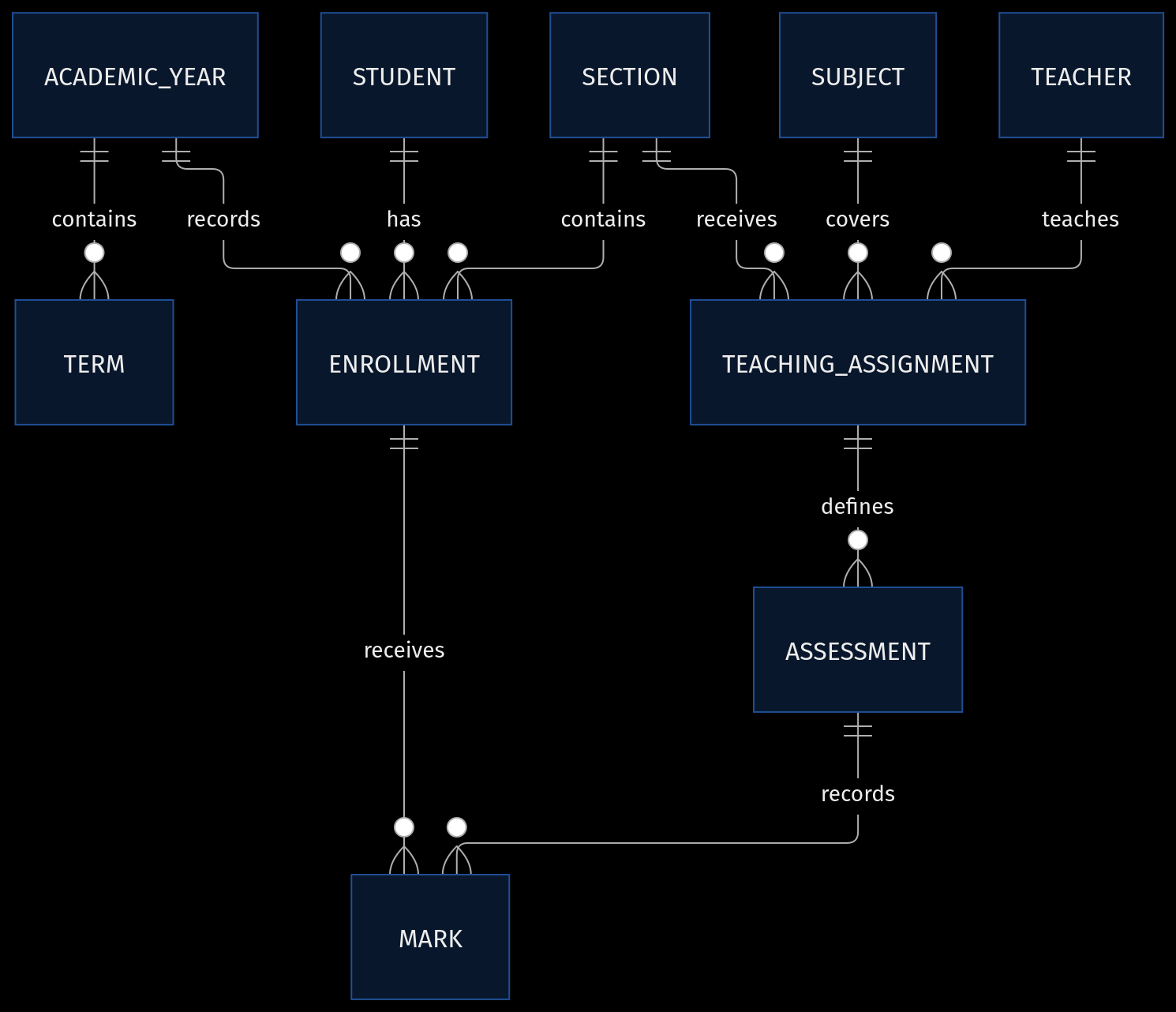
Academic year and term or semester.
Grades and sections.
Subjects.
Teachers and subject assignments.
Exams and assessments.
Marks, grading rules and report cards.
module C: Attendace
-
Is attendance recorded once per day or for every lesson?
-
Can a student arrive late?
-
Can attendance be corrected after submission?
-
Who can edit a submitted register?
-
Can guardians receive absence notifications?
-
How do holidays, school closures and approved absences work?
A sensible workflow is:
-
Teacher opens their assigned class.
-
System loads the enrolled students.
-
Teacher marks each student present, absent, late or excused.
-
Teacher submits the register.
-
Authorized staff can correct errors, with a recorded audit trail.
-
The system generates reports and, if enabled, notifies guardians.
module D: Fees and Finance
A school may charge:
-
Registration fees.
-
Tuition per term or month.
-
Examination fees.
-
Transport fees.
-
Uniform or textbook fees.
-
Other school-specific charges.
The key entities include:
Entity Purpose
Fee structure Defines what should be charged
Invoice Records what a student owes
Payment Records money received
Receipt Provides evidence of a payment
Discount or scholarship Adjusts the amount owed
Refund or reversal Corrects a financial transaction
Payment allocation Connects payments to specific invoices
Module E: Portals and permissions
Administrator
Manages enrollment, academic configuration, accounts and authorized reports.
Teacher
Sees assigned classes, records attendance, enters marks and shares learning materials.
Parent or guardian
Views only linked children’s information, published results, attendance and fee balances.
Student
Views their own timetable, assignments, results and relevant announcements.
- Ethiopian calendar and academic year
Determine whether schools operate their academic schedules using the Ethiopian calendar, Gregorian dates, or both. Store dates consistently and handle calendar conversion at the application boundary where appropriate. Don’t assume an academic year follows January through December.
- Local grading and reporting
Find out the grading scales, report-card formats, promotion rules and government reporting requirements for your target schools. Don’t hardcode one grading policy for every institution.
- Mobile-first access and unreliable internet
A responsive web app is a sensible starting point, but test it on low-cost phones and weak connections. SMS notifications may be more practical than requiring every parent to install an app.
- Local payments
Investigate the payment methods schools and parents actually use, such as bank transfers and supported mobile-money services. Confirm provider APIs, fees, settlement behavior and reconciliation requirements before committing to an integration.
- Language and data migration
Consider Afaan Oromo and Amharic support alongside English, depending on your target market. Schools may already have thousands of student records in Excel or paper registers, so importing, validating and correcting that data is part of the product.
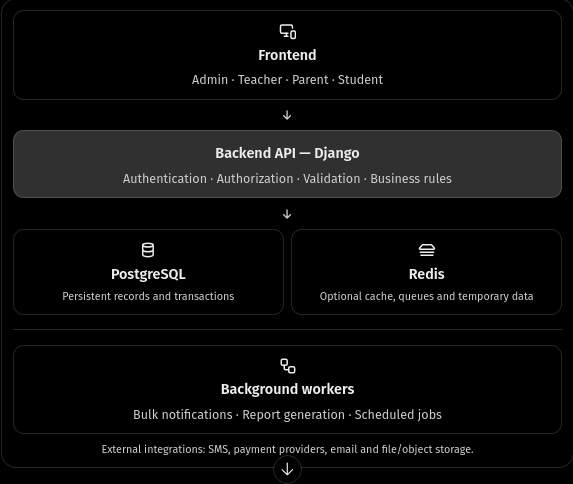
starting architecture
Layer My starting choice Why
Suggested stack
Frontend React + TypeScript Reusable role-specific interfaces
Backend Django + Django REST Framework Authentication, ORM, migrations, admin and mature application structure
Database PostgreSQL Relational records and reliable transactions
Background jobs Celery + Redis, when needed Long-running tasks and scheduled work
File storage S3-compatible object storage Documents, exports and report files
Deployment Docker + Nginx + managed or rented infrastructure Reproducible deployment and predictable operations
Monitoring Error tracking, structured logs, health checks Find and diagnose production failures
MVP = tenant/school, roles and permissions, Student Info, Academics (with report cards), Attendance, thin Communication.
mvp
agreement with marketing team
Commission or revenue share, and how long it applies to a school they brought in.
Whose brand it is (yours, or white-label), and who owns the customer relationship.
Who can sign contracts or make promises on your behalf. It should be only you.
Exclusivity, and what happens if you part ways.
Embedded Files
944624135486a15e5187826c0ef767f66d3ce6d0: mermaid-diagram.png
a01c51c1836d43ff9b7a2878289ea9d5207c534a: Pasted Image 20261021102155_880.png