Git Internals
Core Idea Git is not just a version control tool — it is, at its core, a content-addressable filesystem with a version-control interface layered on top of it.
John Britton, CS50 Tech Talk
What is Git?
Git is not just a version control system. That is true in surface level but it undersells what Git actually is internally.
Definition Git = a content-addressable key-value data store, wrapped in a user-friendly VCS interface.
This means
- You give Git some data (a file, a directory snapshot, a commit).
- Git computes a SHA-1 hash of that data and uses it as the key.
- Git stores the data under that key in
.git/objects. - You can retrieve the exact data later using that key
This is fundamentally different from how file systems work, where files are located by path and name. In Git, they are located on what they contain.
Why This Matters Because storage is content-based, identical content is never stored twice — even across different files or commits. If two files have the same content, they share the same blob object.
The .git directory
When you run git init , Git creates a hidden .git/ folder. This is the entire repo history.all metadata, all objects. If you copied .git/ to another machine, you’d have the full project history.
.git/
├── HEAD            ← points to current branch
├── config          ← repository-level configuration
├── index           ← the staging area (binary file)
├── objects/        ← the object database (blobs, trees, commits)
│   ├── info/
│   └── pack/
├── refs/           ← named pointers to commits
│   ├── heads/      ← local branches
│   └── tags/       ← tags
└── hooks/          ← lifecycle scripts (pre-commit, post-merge, etc.)
Key Entries
Entry Role HEADPoints to your current branch or commit objects/The entire object database (all history) refs/Named pointers (branches, tags) to commits indexThe staging area — what will go into the next commit configPer-repo Git settings
The Object Database
A blob (Binary Large Object) is the simplest Git object. It stores the raw contents of a file, nothing else. No filename, no permissions, no metadata.
blob <size>\0<file content>
Example
$ echo "Hello, World!" > hello.txt
$ git add hello.txt
# Git internally runs something like:
$ echo "Hello, World!" | git hash-object -w --stdin
# → ce013625030ba8dba906f756967f9e9ca394464a
You can inspect it:
$ git cat-file -t ce013625   # → blob
$ git cat-file -p ce013625   # → Hello, World!
$ git cat-file -s ce013625   # → 14  (size in bytes)
Blob Has No Filename The blob
ce0136...knows nothing about being calledhello.txt. The filename lives in the tree object, not the blob. This is why renaming a file in Git doesn't create a new blob if content is unchanged.
Deduplication If two files
a.txtandb.txthave identical content, they produce the same blob hash and Git stores only one object. This is a direct consequence of content-addressable storage.
Tree Objects
A tree represents a directory at a point in time. It contains a list of entries, where each entry describes one item in the directory.
Tree Entry Format
Each entry contains
- Mode — file type/permissions (e.g.
100644for regular file,040000for directory) - Type —
blobortree - SHA-1 — hash of the blob or sub-tree
- Name — the filename or directory name
Example
$ git cat-file -p HEAD^{tree}
# Output:
100644 blob ce013625...   hello.txt
100644 blob a1b2c3d4...   README.md
040000 tree f9e3d2c1...   src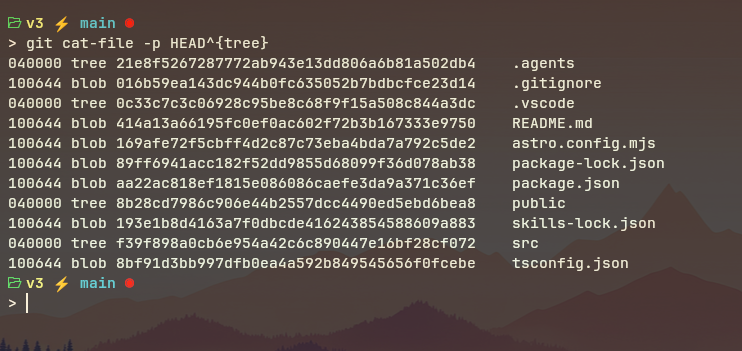
This means the root directory contains
hello.txt→ blobce013625README.md→ bloba1b2c3d4src/→ another treef9e3d2c1(which itself contains more blobs/trees)
Trees Are Recursive Trees can reference other trees — this is how subdirectories work. Git mirrors the full filesystem hierarchy this way.
Tree Object Structure (Conceptual)
Tree (root)
├── 100644 blob abc123  README.md
├── 100644 blob def456  hello.txt
└── 040000 tree ghi789  src/
                 └── 100644 blob jkl012  app.js
Trees Capture Snapshots, Not Diffs A tree is a full snapshot of a directory at a given moment — not a diff from the previous state. Git's efficiency comes from reusing unchanged blobs and trees across commits via shared SHA-1 references.
Commit Objects
A commit is what ties everything together. It is a Git object that records:
- Tree SHA-1 of the root tree (the full project snapshot at this point)
- Parent(s) SHA-1(s) of the preceding commit(s) — this is what forms history
- Author name, email, and timestamp of who wrote the change
- Committer name, email, and timestamp of who committed (can differ from author in patches/rebases)
- Message the commit message
Example Commit Object
$ git cat-file -p HEAD
tree   4b825dc642cb6eb9a060e54bf8d69288fbee4904
parent 9fceb02d7f3fcbf0de44e5d9018cb085ea2cb57c
author  John Britton <john@github.com> 1522800000 -0500
committer John Britton <john@github.com> 1522800000 -0500

Add hello.txt with greeting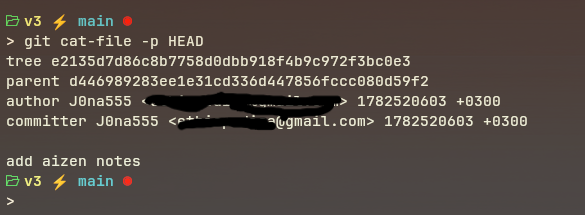
Every Commit = Full Snapshot A commit does not store a diff. It stores a pointer to the entire project tree. Git's efficiency comes from shared objects: if
README.mddidn't change, the new commit's tree still references the same old blobabc123. No duplication, no re-storage.
Commit Hash Depends on Everything
Because the commit hash is the SHA-1 of all its contents (including the parent hash, timestamps, message, and tree), changing anything changes the hash. This is why:
git commit --amendproduces a new commit with a different hash- Rebasing rewrites commit hashes
- History is tamper-evident — any alteration breaks the chain
Reference (Refs) and HEAD
Raw SHA-1 hashes are unwieldy. References (refs) are human-readable names that point to commit hashes.
Types of Refs
| Ref Type | Location | Example |
|---|---|---|
| Branch | .git/refs/heads/<name> | refs/heads/main |
| Tag | .git/refs/tags/<name> | refs/tags/v1.0 |
| Remote branch | .git/refs/remotes/<remote>/<name> | refs/remotes/origin/main |
| A branch file contains simply the SHA-1 of the commit it points to |
$ cat .git/refs/heads/main
# → a1b2c3d4e5f6...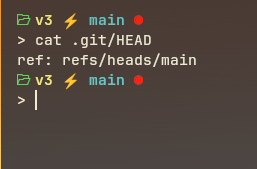
When you write a new commit
- Git writes a new commit object (with parent = old HEAD commit)
- Git updates
refs/heads/mainto the new commit hash HEADstill points torefs/heads/main, it just follows forward
Detached HEAD State If you checkout a commit directly (
git checkout abc123),HEADpoints to the commit hash instead of a branch name:HEAD → abc123... (detached)New commits made here won’t be on any branch and can be garbage-collected later.
The Index
The index (also called the “staging area” or “cache”) is stored in .git/index as a binary file. It acts as a draft of the next commit.
The Three-State Model
Working Directory  →  (git add)  →  Index  →  (git commit)  →  Repository
   (edit files)                  (stage changes)              (write commit)
| Zone | What It Is |
|---|---|
| Working Directory | Files you edit on disk, untracked changes live here |
| Index | Staged snapshot, what will become the next commit |
| Repository | Committed objects in .git/objects, permanent history |
What git add Does Internally
- Reads the file from disk
- Computes SHA-1 → creates a blob object in
.git/objects - Updates
.git/indexto record:<mode> <blob-hash> <filename>
What git commit Does Internally
- Reads
.git/index - Writes tree object(s) representing the staged directory structure
- Creates a commit object pointing to the root tree and the parent commit
- Updates the current branch ref to the new commit hash
git diffcompares Working Directory vs. Index.git diff --cachedcompares Index vs. last Commit.
The Commit Graph
Git’s history is a Directed Acyclic Graph (DAG) of commit objects. Each commit points to its parent(s), forming a chain going backward in time.
Why a DAG?
- Directed: arrows go from child → parent (newest → oldest)
- Acyclic: no commit can be its own ancestor
- Graph: supports multiple parents (merges) and multiple children (branches)
Linear History
C0 ← C1 ← C2 ← C3 (main)
Branching and Merging
C0 ← C1 ← C2 ← C3 ← M    (main, M = merge commit)
           ↑         ↗
           F1 ← F2        (feature branch)
Mis a merge commit — it has two parents:C3andF2- Branches (
main,feature) are just refs that move forward as you commit
Branches Are Cheap A Git branch is literally a 41-byte file (40-char SHA + newline) in
.git/refs/heads/. Creating or deleting a branch is near-instantaneous — it just writes or deletes that tiny file.
Plumbing vs. Porcelain Command
Git distinguishes between two layers of commands:
| Layer | Name | Description | Examples |
|---|---|---|---|
| Low-level | Plumbing | Direct access to Git’s internals; scriptable, stable API | git hash-object, git cat-file, git write-tree, git commit-tree, git update-index |
| High-level | Porcelain | User-friendly; built on plumbing | git add, git commit, git branch, git log, git status |
Why the Names? Like plumbing in a house vs. the polished porcelain fixtures — the plumbing is what actually moves water (data), but users interact with the fixtures. Git's porcelain commands orchestrate several plumbing steps internally.
Key Plumbing Commands for Exploration
git hash-object -w <file>       # hash & store a file as a blob
git cat-file -t <hash>          # show object type
git cat-file -p <hash>          # pretty-print object contents
git cat-file -s <hash>          # show object size
git ls-files --stage            # show index contents
git write-tree                  # write index as a tree object
git commit-tree <tree> -p <par> # create a commit from a tree
git update-index --add <file>   # manually add file to index
git read-tree <tree>            # load a tree into the index
Compression
Loose Objects
When Git first writes an object, it stores it as a loose object:
- The data is compressed using zlib (DEFLATE) compression
- Stored at
.git/objects/XX/YYYY... - Not human-readable without decompression
# Decompress manually (Linux):
$ python3 -c "import zlib,sys; sys.stdout.buffer.write(zlib.decompress(open('.git/objects/ce/013625...','rb').read()))"
Packfiles
Over time, a repository accumulates many loose objects. Git periodically (or on git gc) packs them:
- Objects are bundled into a single
.packfile under.git/objects/pack/ - A
.idxindex file provides fast lookup within the pack - Delta compression is applied: similar objects store only their differences, not full copies
- This dramatically reduces storage for large repos with many similar versions of files
When Does Packing Happen?
- Automatically after many loose objects accumulate
- On
git gc(garbage collect)- During
git push/git fetch(data is transferred as a packfile)
The Full Lifecycle
Here is the complete internal flow when you do everyday Git operations:
Step-by-Step: git add hello.txt
1. Read hello.txt from disk
2. Compute SHA-1 of ("blob <size>\0<content>")
3. Compress content with zlib
4. Write compressed data to .git/objects/XX/YYY...
5. Update .git/index: add entry "100644 <hash> hello.txt"
Step-by-Step: git commit -m "Add hello"
1. Read .git/index
2. Build tree object(s) from index entries → write to .git/objects
3. Create commit object:
     tree   <root-tree-hash>
     parent <previous-commit-hash>   (if any)
     author / committer info
     message
4. Write commit object → .git/objects
5. Update current branch ref (.git/refs/heads/main) → new commit hash
6. HEAD still points to refs/heads/main → effectively moves forward
What a commit actually "is" A commit is just a small text file (the commit object) that says: "The project looked like tree X, it came from commit Y, written by person Z at time T, with message M." All the actual file data lives in blobs, referenced through trees.
Practical Commands to explore Internals
Initialize and Inspect
mkdir demo && cd demo
git init
ls -la .git/              # see the structure
cat .git/HEAD             # → ref: refs/heads/main
Create a Blob Manually
echo "Hello, World!" | git hash-object -w --stdin
# → ce013625030ba8dba906f756967f9e9ca394464a
git cat-file -t ce013625  # → blob
git cat-file -p ce013625  # → Hello, World!
Stage and Inspect the Index
echo "Hello, World!" > hello.txt
git add hello.txt
git ls-files --stage      # → 100644 ce013625... 0  hello.txt
Commit and Walk the Objects
git commit -m "Initial commit"
git log --oneline         # → abc1234 Initial commit

git cat-file -p abc1234   # commit object
git cat-file -p <tree-hash>   # tree object
git cat-file -p <blob-hash>   # blob content
List All Objects
find .git/objects -type f   # all loose objects
git cat-file --batch-all-objects --batch-check   # all objects with type and size
Visualize the Commit Graph
git log --oneline --graph --decorate --allPlumbing: Build a Commit from Scratch
# 1. Write a blob
BLOB=$(echo "test" | git hash-object -w --stdin)

# 2. Add to index
git update-index --add --cacheinfo 100644,$BLOB,test.txt

# 3. Write tree from index
TREE=$(git write-tree)

# 4. Create commit
COMMIT=$(echo "manual commit" | git commit-tree $TREE)

# 5. Update branch to point to new commit
git update-ref refs/heads/main $COMMIT
Further Reading
| Resource | Focus |
|---|---|
| Pro Git — Chapter 10: Git Internals | The official, authoritative deep-dive |
| FreeCodeCamp: Visual Guide to Git Internals | Accessible visual walkthrough |
| Git Magic (Stanford) | Classic guide with internals coverage |
| Atlassian Git Tutorial | User-friendly with good diagrams |
git help gitrepository-layout | Official manpage for .git/ structure |
git help gitcore-tutorial | Plumbing commands walkthrough |
Note compiled from: CS50 Tech Talk Git Internals by John Britton (GitHub), 2018. Source video: https://youtu.be/lG90LZotrpo